
Appearance
Metaplay Agent
Make your coding agent an expert Metaplay developer with our official Metaplay SDK skills.
Make your coding agent an expert Metaplay developer with our official Metaplay SDK skills.
metaplay update cli command.The Metaplay Agent is our most powerful AI feature that teaches AI coding agents like Codex, OpenCode, or Claude Code how to work with the Metaplay SDK. Our customers already use it to build new features, triage player incidents, root cause server errors, review PRs, and more.
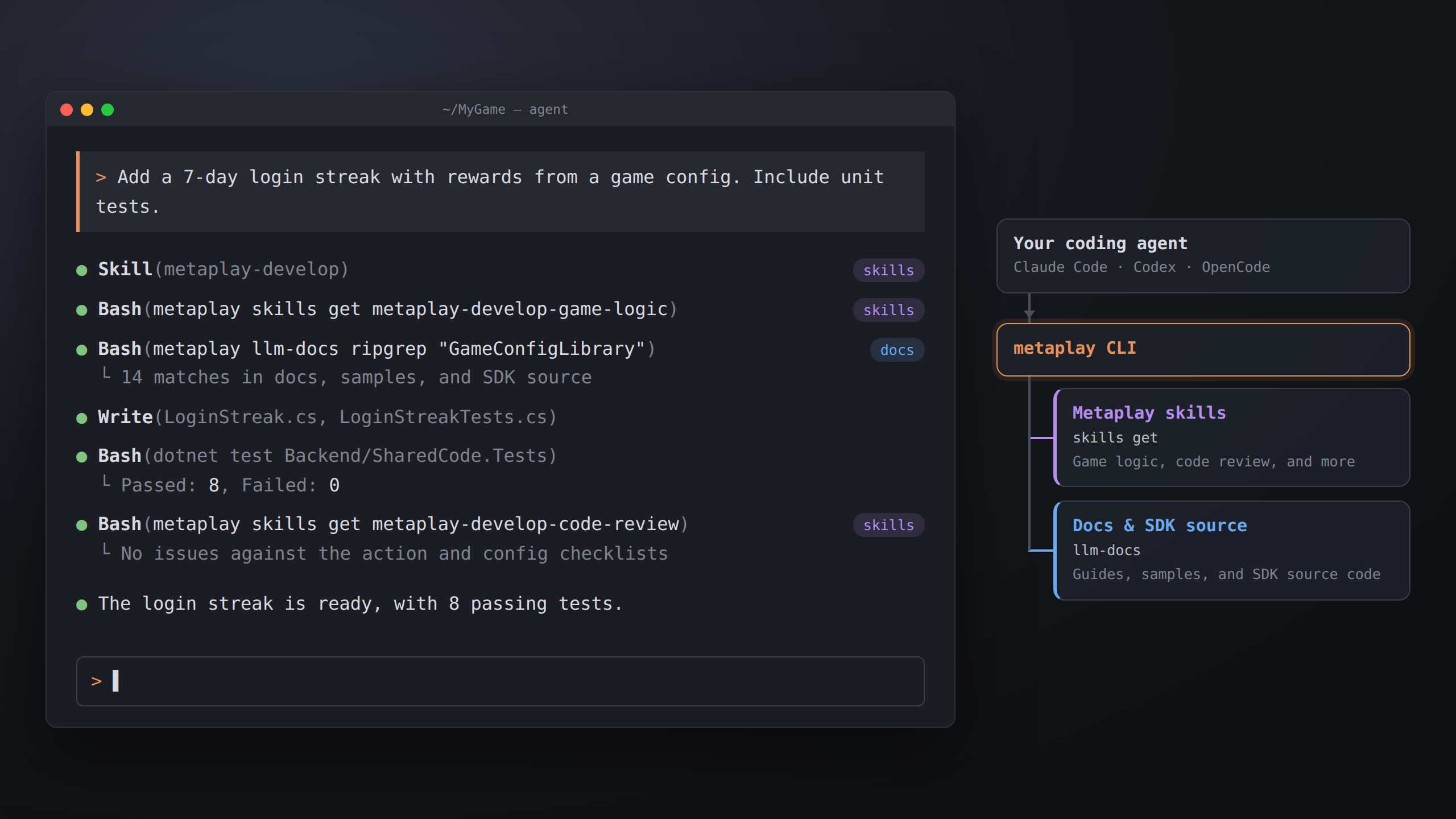
Under the hood, Metaplay Agent is implemented as agent skills, an open standard for teaching AI deep knowledge about any given topic.
Because we've built the Metaplay Agent on open standards and made it super portable via the CLI, you can easily run it on any coding harness both on your desktop, in an autonomous agent in the cloud, or even inside your CI jobs!
Here is a real example prompt that works without installing the skills:
> Run `metaplay skills try` to discover available skills, then triage any errors in production game server logs.

⏺ Bash(metaplay skills try 2>&1)
⏺ Bash(metaplay skills get metaplay-devops-view-logs 2>&1)
  Read metaplay-project.yaml
⏺ Bash(metaplay debug logs prod --since=1h 2>&1 | tail -40)

[the agent continues to do tool calls]
In the above snippet, you can see how the agent first called metaplay skills try, read the output and decided to call metaplay skills get metaplay-devops-view-logs to learn about Metaplay's logging tools. Armed with the view-logs skill, it then read the metaplay-project.yaml to see what environments are available and finally used the metaplay debug logs command with various options to start reading logs from the correct server.
The Metaplay Agent can dynamically discover all the tools and features we have built for Metaplay and use them on your behalf!
Installing the skills makes them automatically available in any future coding session. Use our CLI to install them:
MyProject$ metaplay skills installYou have two options for where to install them:
After installing, restart any coding agents you may have open and they should auto-discover the new skills on start.
Just chat with your AI agent as usual. When installed, the agent will know about all our skills and will pick the right ones based on the topic at hand.
We recommend using the large frontier models when getting started. They are better at reasoning about what skills to use than smaller, local models.
Metaplay Agent is a very capable assistant that can handle ambitious tasks when paired with a frontier model. Here are a variety of prompts to get you started. Feel free to write them in your own words and customize them to fit your project and style!
| Goal | Prompt |
|---|---|
| Implement a feature | Add a daily reward feature: a player can claim a reward once every 24 hours, with the reward defined in a game config. Wire it through the model, an action, and a config entry. |
| Review code | Review the changes in this PR for Metaplay model and action rule violations — focus on determinism and immutability. |
| Upgrade the SDK | Upgrade this project to the latest Metaplay SDK release and walk me through the migration steps. |
| Run the project locally | Start the local server and dashboard and open the dashboard in my browser. |
| Analyze a player incident | Investigate this incident report: [link to a player incident in the LiveOps Dashboard] |
| Find issues in production logs | Check the last hour of logs on my production environment for errors and group them by root cause. |
| Diagnose a misbehaving deployment | The staging server is crash-looping after my last deploy — figure out why and suggest a fix. |
| Deploy a server image | Build a server image from the current branch and deploy it to my staging environment. |
| Capture a CPU profile | Capture a 60-second CPU profile from the production server and tell me what the hot paths are. |
We have organized the Metaplay Agent into four top-level skills that each have a number of sub-skills. The current skills are focused on the technical aspects of game development:
metaplay CLI itself misbehaves.Beyond pure engineering, the skills even cover some game design patterns via our documentation!
Typically, your agent will pick the right skills up automatically (as long as you have them installed). If your agent is not doing this, you can always enforce the behavior by naming the skill.
When using agents to develop new features, you'll get much better results if you generate tests for the feature as well: the quality of the output will be higher, you'll need fewer iterations of polish on the agent's output, and you'll be left with regression tests for the future.
Metaplay's programming model is very well suited for unit tests as the models and actions can be easily tested in a standalone C# unit test project. If you don't already have such a project scaffolded, Idler sample project's unit tests are a good starting point.
You can easily scaffold the tests in your project using AI:
> Scaffold a C# unit test project. Use Metaplay Idler sample's `Backend/SharedCode.Tests` as a reference.TIP
Prefer the directory Backend/SharedCode.Tests/ for this test project. The agents expect it to be there.
Use metaplay dev server --watch (or -w) to run the game server in watch mode:
MyProject$ metaplay dev server --watchThe server automatically restarts when code changes, which makes iterating on features faster.
Watch mode also leaves the build outputs unlocked, so the agent can compile, test, and verify the project while the server keeps running. By default, a running server holds DLL file locks that block compilation — watch mode avoids this.
It's best practice to run your agents within VMs or in containers to avoid them having access to all the sensitive data on your host machine.
With Metaplay development, this gives the additional benefit that each VM or container can have its own copy of the client/server running without interfering with other running servers.
This can increase the level of autonomy you can give to the agent as it can run end-to-end tests using the BotClient and the server, for example.
The Metaplay Agent does all of its actions using the Metaplay CLI. This means that you can limit the agent by creating a machine user in the developer portal and giving it a non-admin role. You can even create custom roles in the game server to heavily limit the agent to only the actions you want.
In your cloud environment (Claude Code for Web, Codex Cloud, GitHub Actions, ...) you can set the Metaplay CLI authentication with the METAPLAY_CREDENTIALS env variable.
Additionally, using dedicated machine accounts makes the agent have its own identity in your game server's audit logs.
Like the rest of Metaplay, our agent is designed to be extensible to your own needs. Technically, the skills are implemented as markdown fragments that are accessed with the metaplay skills get command. You can make your own skills that instruct the agent to read specific sub-skills with your custom instructions for extra context.
You can manually invoke the CLI to list the available skills or to see what each skill does:
# List the top-level / all skills
metaplay skills list
metaplay skills list --full

# Get an individual skill
metaplay skills get metaplay-develop
metaplay skills get metaplay-develop-code-review/review slash-command that loads metaplay-develop-code-review plus your team's PR checklist.metaplay-devops-view-logs, your own notes on what errors or warnings to focus on.metaplay-develop-incident-analysis plus instructions on how to create high quality tasks in your team's task tracker.metaplay skills list --full shows every available skill and sub-skill that you can reference in your own skills or commands.
The Metaplay Agent does not have to live in a box of its own. We use a variety of coding harnesses and models (both frontier and local) at Metaplay and they all have their uses.
For example, you can use a cheaper, open model like DeepSeek with a highly customizable harness like Pi to help analyze a large volume of player incidents or logs. Or pair a frontier model to help turn game design specs in Google Docs into technical specs in Jira by first cross-referencing them with existing Metaplay patterns.
You can even make custom admin API endpoints in your game server and teach the Metaplay Agent to use them for game-specific tasks like solving common customer support requests.
For best results, you should consider the three main components of any robust agentic loop:
We have spent a very large amount of effort in making sure the Metaplay Agent has as much context about Metaplay as possible, our tools are snappy to use, and our SDK ships with a large test coverage. By continuing to develop your own project-specific context, tools, and validation, you can get even more use from coding agents!
If your project uses Unity, give the agent a way to drive the editor. At minimum, we recommend a tool like UnityCtl:
You can remove the Metaplay Agent by deleting the associated skill files. You can use our CLI's helper command for it:
MyProject$ metaplay skills removeOnly files installed by metaplay skills install are touched.
Using our Metaplay CLI, your agent can autonomously connect to our other services like the Metaplay Docs MCP and Metaplay Portal MCP when needed.