
Appearance
Release 37
May 28th, 2026
May 28th, 2026
Hotfix release
Release 37.1 is the latest hotfix release for Release 37.
The Runtime Options view has been rewritten to provide smoother navigation with integrated search. This makes it easier to debug your runtime options settings from the dashboard.
The Raw Data views have been rewritten to provide smoother navigation with integrated search. This makes it easier to navigate, understand and debug your raw data.
You can now build your project against Unity's com.unity.purchasing 5.x package. The SDK auto-detects the installed version and selects the matching codepath, so existing v4 projects continue to work unchanged. v5 validates Apple receipts via StoreKit 2 / JWS. See Upgrading to Unity IAP v5 when you are ready to migrate.
.NET 9 Support Removed - The minimum .NET runtime version for the backend is .NET 10. If you haven't upgraded yet, follow the Release 36 migration guide For All Metaplay Projects.
Prebuilt Code Analyzers - The Metaplay code analyzers (Metaplay.CodeAnalyzers and Metaplay.CodeAnalyzers.Shared) are now shipped as prebuilt DLLs instead of project references. This eliminates sporadic file-locking build failures when building multiple projects in parallel.
New Analyzer: Incorrect StringId.Value Checks - A new code analyzer (MP_SID_00, MP_SID_01) warns when code incorrectly checks StringId.Value for null or emptiness. A no-value StringId is represented by the reference itself being null, so .Value is never null or empty — these checks are bugs that should test the StringId reference instead.
Stricter Database Writes with MySql Backend - Game servers using the MySql backend now enforce strict per-session validation on every database write, regardless of the server's global configuration. Writes that would previously have been silently truncated, coerced, or accepted with invalid values — overlong strings, out-of-range numerics, zero dates — now raise errors at write time. This particularly affects cloud deployments on AWS Aurora MySQL, which historically shipped with permissive defaults. Only relevant if your project defines custom database tables or columns. See the migration guide for what to watch for and how to temporarily opt out.
Major Improvement: GameConfig Build Window - The Unity editor window for building and deploying game configs has been redesigned with improved visual layout, build feedback, and reliable cancellation. You can now cancel builds mid-operation, and a new progress system shows per-entry detail during builds. See the migration guide for one breaking API change.
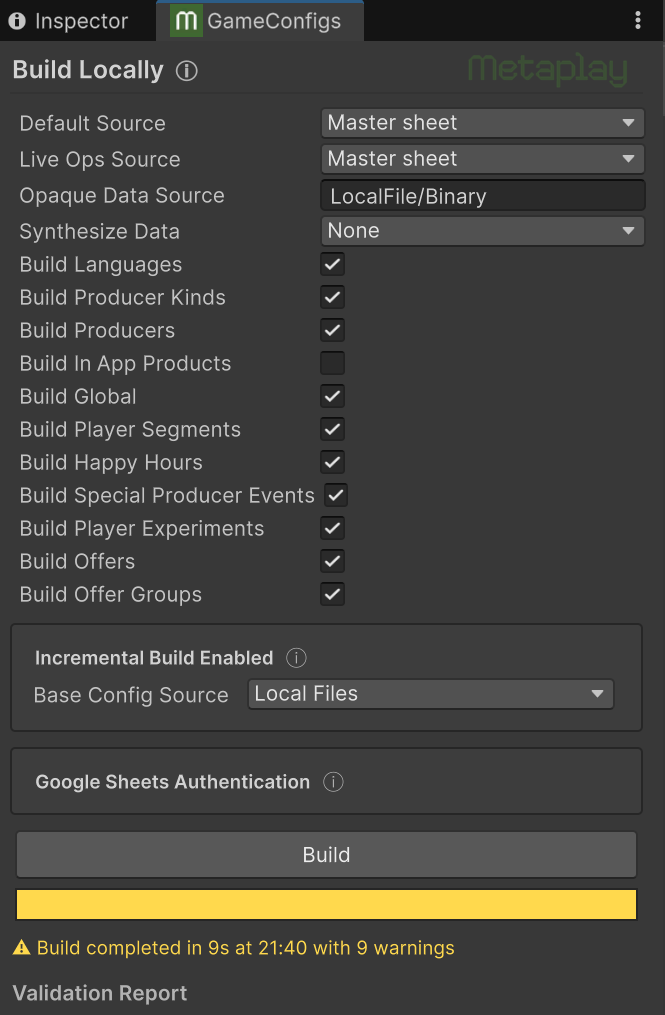
GameConfigBuildUtil — new engine-agnostic build utility class that can be used to trigger builds programmatically.UnityGameConfigBuildHelper — Unity-specific build helper with a public API for triggering builds from code, scripts, or AI assistants. Call UnityGameConfigBuildHelper.Build() from any editor context.GameConfigBuildProgress class and GameConfigBuildDebugOptions.Progress for structured per-entry build progress reporting.IGameConfigSourceFetcherProvider.Progress — default interface property for granular progress reporting during source fetching.FileUtil.ReadAllBytesAsync(string, CancellationToken) overload for cancellable file reads.F32 and F64 types are now editable via the Unity Inspector.BotClientMain now detects at startup if Metaplay.Server is accidentally referenced and fails early with a clear error message.PlayerEventClientConnected analytics event now contains the Id of the active Game Config.TranslationId doesn't have to be first).Connection entities now contain also the Player entity ID after the login has been validated. This makes it easier to search for a given player's connections in the log.MetaDuration properties on Runtime Options classes can now be configured from YAML, command line, and environment variable sources using the unit format (e.g. 1d 2h 30m, 30m, 1.5s). See Supported Value Types for details.LocalServer.CommandLineArgumentProvider integration class allows customizing command line for the Local Server started from Unity.GameConfigDataContent<TConfigData> can now be used also for abstract game config base types, not just concrete types.IGameConfigData classes without parameterless constructors are now allowed. The need for a parameterless constructor can be avoided by using the [MetaDeserializationConstructor] and [MetaGameConfigBuildConstructor] attributes.EntityActor.CreateWakelock() to allow temporarily extending entity lifetime.GuildActor.OnMemberIsOnlineChangedAsync() for reacting to guild member coming online or going offline.Database:MySqlSqlMode runtime option to configure the per-session MySQL sql_mode. Defaults to the upstream MySQL 8.0 strict default; set to null to inherit the database server's global sql_mode.GuildSearchActorBase.GetSearchFilter() allows narrowing guild search results at the SQL level.ICustomComparable interface for using game-defined value types (such as named tiers or composite ranks) as range-comparable player segment properties. Implement the interface on your type and register a parser to make it usable in the segment sheet's PropMin/PropMax columns. See Custom Comparable Properties for details.IGameConfigSourceData.Get() now takes a CancellationToken parameter. The old Get() is preserved as an [Obsolete] default interface method that forwards to the new one. If you have custom IGameConfigSourceData implementations, update them to accept the token. See the migration guide.SessionOptions.SessionLingerDuration runtime option. ConnectionConfig.MaxSessionRetainingPauseDuration and ConnectionConfig.MaxNonErrorMaskingPauseDuration are removed, and SessionActor.ShutdownPolicy is sealed.ConnectionConfig.SessionResumptionAttemptMaxDuration has been replaced by ConnectionConfig.MaxReconnectingForegroundDuration. The new budget counts foreground time only, so a brief background interruption no longer eats the session-resumption attempt window.MetaplaySDK.ApplicationPauseMaxDuration property has been removed.GuildSearchActorBase.EntityIdOnCurrentNode has been replaced by the GuildSearchActorBase.GetLocalNodeEntityId() helper.DefaultEnvironmentConfigProvider.GetAllEnvironmentConfigs() now returns IReadOnlyList<EnvironmentConfig> instead of EnvironmentConfig[], avoiding an unnecessary array copy on each call. Callers using .Length should switch to .Count.int- and enum-keyed dictionaries, instead of a positional index. This makes it easier to identify which entry differs.ParseLegacyVersion1PoolPage() has been removed from PersistedGuildDiscoveryPool.Microsoft.CodeAnalysis packages in Metaplay.Cloud from 4.8.0 to 4.14.0, fixing locale warnings in CI and resolving a CVE in a transitive dependency (Microsoft.Build.Tasks.Core).SharpCompress dependency in Metaplay.Cloud with the built-in System.Formats.Tar API. This resolves SCA scanner reports for CVE-2026-44788; the SDK was not exploitable, as the only use site is a memory-only read of a trusted MaxMind archive.Parquet.Net in Metaplay.ServerShared from 4.25.0 to 5.6.1 to drop the vulnerable transitive Snappier 1.1.6 dependency (GHSA-pggp-6c3x-2xmx). Internal Parquet snapshot reading in the player re-delete admin endpoint has been migrated to the new ParquetSerializer API.MetaFormUseAsContextAttribute is renamed to MetaFormUseAsRootAttribute.Scripts/integration-tests.py script has been removed. Use metaplay test integration instead.Metaplay.Analyzers.targets file, eliminating file-locking errors during parallel builds. See the migration guide for upgrade instructions.EnvironmentFamily configuration instead of the ASP.NET hosting environment to determine the active deployment. The launchSettings.json file is no longer needed.new Random() with Random.Shared throughout the server-side codebase.byte[] arrays are now JSON-serialized as a base64-encoded string in all serialization modes. Specifically they are NOT encoded as {"$type":"System.Byte[]","$value":"XXX"}.IReadOnlyList<T> instead of List<T> to express immutability.DisconnectedFromServer is now emitted also if session start fails, to better mirror ConnectedToServer behavior.ChecksumUtil.PrintDifference has been removed as it was a complicated wrapper for PrettyPrinter.Difference().BeginSubscribeToAssociatedEntityAsync() no longer takes clientChannelId parameter. Generate ID with NextEntityChannelId() instead.$t synthetic type field.JWKSPublicKeyCache minimum renewal period increased from 10s to 60s to reduce unnecessary key refresh requests.EntityShard.StartAsync() calls the base.StartAsync() or not.entrypoint binary to use Go v1.26.3.MetaplayWebhookController is deprecated to encourage use of PublicWebApiController. MetaplayWebhookController will continue to be supported.AuthToken, a warning-level message is logged on the server, not only debug-level.AppleStore:AppleSharedSecret directly is now deprecated. This is in favor of the new AppleStore:AppleSharedSecretPath which allows using secrets management to avoid storing secrets in the project repository.Fast-forwarded model log debug message as it was not useful.ConfigArchiveBuildUtility.FolderEncoding.WriteToDirectory() now have a binary header, changing the on-disk format. To access a single entry without reading the whole directory, use FolderEncoding.ReadEntryContents[Async]().ConfigArchiveBuildUtility.FolderEncoding.WriteToDirectory(archive, path) is deprecated, use WriteToDirectory(archive, path, mode) instead.guildInviteCodeSalt in MetaplayCoreOptions is now an optional parameter.GuildActor.ShouldAcceptPlayerJoin() signature is changed to receive ShouldAcceptPlayerJoinArgs.PlayerIncidentStorage.SerializeAndPersistIncidentAsync() has been renamed to TrySerializeAndPersistIncidentAsync() and it returns whether the incident was both new and not invalid.PersistedAuditLogEvent constructor now truncates EventId, Source, Target, and SourceIpAddress explicitly in application code to fit their declared column lengths. Previously this truncation happened silently in the database under permissive sql_mode; doing it in code keeps behavior consistent under strict sql_mode.string is now LONGTEXT instead of TEXT. TEXT was limited to at most 64k characters on MySQL backend.long is now BIGINT instead of INTEGER. INTEGER was limited to at most 32-bit integer range on MySQL backend.uint or ulong are no longer supported implicitly. The column type must be explicitly set with the [Column] attribute.BigQueryFieldValidator.VerifyField now includes the full dotted path to the failing field in validation error messages, making it easier to identify nested schema mismatches.ShardingStrategies.CreateSingletonService() no longer allow on-demand creation of entities other than the singleton.ProtocolErrorUnexpectedLoginMessage during session start if the server produced game messages before the session start response was fully delivered to the client.Dockerfile.server heredoc blocks now strip \r characters, making the build resilient to CRLF line endings (e.g., when the project is managed outside of Git without .gitattributes enforcement).PersistedAt timestamp instead of client-provided IncidentId.Fixed64.Lerp(a, b, t) now correctly returns a when t=0 and b when t=1, matching the standard lerp convention. Previously the interpolation was reversed.errno to error message mapping now works on iOS too, converting internal errors like mono-io-layer-error (61) into readable connection refused messages.SessionLostInBackground transient errors.SessionStartFailure as expected but also one copy as a TerminalNetworkError.TerminalNetworkErrors instead of SessionStartFailed.JournalModelCloningChecker has been removed as it was unsound and could have produced false warnings and exceptions when [NoChecksum] fields were present.METAPLAY_CREDENTIALS environment variable no longer triggers an unknown runtime option warning at server startup.MultiplayerEntityActorBase.IsTicking from true to false at runtime will now correctly stop internal timer. This happens for example when a Season ends in a Division.OnClientSessionHandshakeAsync, OnSessionStartAsync, and OnNewOwnerSession (or OnClientSessionHandshake and OnClientSessionStart for multiplayer entities), making it easier to identify which handler caused the timeout.ServerEventExperimentInfo analytics events now have IsActive parameter value false (or 0) rather than true (or 1).RandomPCG fields in analytics events are now ignored by the BigQuery analytics sink. Their internal seed was not serializable.PlayerEventExperimentAssignment analytics event now correctly sets the VariantAnalyticsId equal to the ControlVariantAnalyticsId configured in the PlayerExperiments game config library. Previously, VariantAnalyticsId for control group was null (or missing value, in the case of BigQuery analytics).Entity ... is in WaitingShardStart state but shard is in unexpected phase Running leaving the entity stuck forever until server restart.MissingContent errors for dynamic-content in-app purchases. It has been seen that Apple App Store purchases sometimes have a stale receipt in the initial validation of a purchase, leading to validation failure, but then the receipt is up to date on subsequent re-validation attempts (done on client app launch). Previously, with dynamic-content purchases, the initial failure would lead to the designated dynamic content being no longer available for the re-validation attempts, leading to persistent failures with MissingContent purchase result. Now, the dynamic content is retained until a successful purchase of the product; this way, the purchase re-validation can eventually succeed.IAPManager now detects duplicate per-platform product IDs at store initialization and reports a clear error instead of throwing an opaque ArgumentException from Unity Purchasing.dotnet ef migrations add now fails early with a clear error if the ModelSnapshot.cs file is read-only (e.g. in Perforce), instead of writing migration files and then failing on the snapshot update.ScheduleExecuteOnActorContext() with a time in the past no longer emits spurious overload warnings.MetaTime? are now rendered correctly in Model Inspector.$type mapping in admin API's JSON deserialization to also accept generic MetaSerializable types. Previously, it would reject generic types such as MyType<MyOtherType>, leading in particular to bogus errors in generated forms in the dashboard.1310 (resource_activation_failed) due to client-side exception "Failed to open download cache config [...]". This happened in projects with multiplayer entities, such as league divisions. The client has been fixed to permit starting the session before it has downloaded multiplayer entities' game configs. MultiplayerEntityClientBase.Phase is MultiplayerEntityClientPhase.LoadingEntity while the client is downloading the entity's game config in the background.MAbbreviateNumber now allows you to explicitly specify which words to use for singular and plural amounts. This covers use cases where simply adding an s to the end of the unit word to represent plural numbers is not sufficient.IGeneratedUiFilterProps now contains fieldInfo to allow custom UI element selection using fieldTypeHint.byte[] fields via file upload and download.MCollapse component now has a new keepContentAlive prop to allow you to prevent content from being unmounted/mounted as you close/re-open the collapse. This can make it easier to manage complex state inside a collapse.MCard component now has a new stickyHeader prop. This keeps the card's header section visible even when the card is taller than the browser window.MCollapse component now has an optional isOpen prop that allows you to control the open/closed state of the collapse from outside the component.MClipboardCopy component now has an optional title prop that customizes the hover tooltip on the icon button variant and the button label on the full-size variant (replacing the previous slot-based label).useGeneratedUiFieldForm() output validationError is now string | undefined instead of string | null.GeneratedUiFormDynamicComponent param context-obj has been renamed to root-obj.IGeneratedUiFieldTypeSchema.useAsContext is renamed to useAsRoot.IGeneratedUiFieldInfo.context has changed type from [{ key: string; value: any }] | undefined to Record<string, any>.IGeneratedUiFilterProps.serverContext is renamed to context and may no longer have value undefined.IGeneratedUiFilterProps.page was always undefined and has been removed.routeParamToSingleValue() has changed. It now takes the full route.params object and the name of the parameter as a string.isOpenByDefault prop was removed from the MCollapse component. Use isOpen instead to control whether the collapse starts open or closed.MRawDataCard has moved from unstable to stable, becoming more performant and easier to navigate along at the same time.MRawDataCard now takes a sources array instead of flat data/label props, allowing multiple sources to be shown with a single card.pnpm-workspace.yaml instead of package.json, and the build-dependency allow-list moves to a new allowBuilds map. See the Update to pnpm 11 migration guide for the upgrade steps.MCard no longer emits the headerClick event when clickableHeader is not set, preventing unintended side effects.OfferGroupsCard due to a slot name mismatch.MInputSwitch incorrectly showing focus outlines on the label element when no label was provided.MInputSingleSelectDropdown and MInputSingleSelectAsyncDropdown no longer show the background page through the dropdown's option list when it is over-scrolled.MInputNumber component would not clear its value when entered and cleared repeatedly.MViewContainer, MSingleColumnLayout, and MTwoColumnLayout components now control margins on a page consistently. You no longer need to add manual margins to the content inside them.MInputSingleSelectSwitch vertical alignment and layout-shift issues, especially in the small-size variant.MetaRequest/MetaResponse instead of manual MetaMessage listeners, demonstrating the simpler async request-response pattern. See Client-Server Requests for details.launchSettings.json files from all sample projects.MetaRequest/MetaResponse system.GuildDiscoveryInfoBase / GuildDiscoveryPlayerContext fragments.ICustomComparable interface.MetaDuration properties (1d 2h 30m, 30m, 1.5s).MaxReconnectingForegroundDuration budget.New Command: metaplay init ci - Create build & deploy server CI jobs for various CI systems.
New Command: metaplay image pull - Pull an image from a remote environment to your local machine.
New Command: metaplay image list - List remote images in an environment.
Improved metaplay init project - The command now builds the set of files to write in memory first.
.meta files.Significantly Improved Error Messages - Errors are now easier to read and give more actionable information.
We are aware of the following issues in this release:
SessionStartFailed IncidentsDue to a fix that changed some connection failures to report incident SessionStartFailed instead of TerminalNetworkError, the amount of SessionStartFailed incident reports may increase (while the amount of TerminalNetworkErrors decreases). The alerting system may detect this increase in incident reports of a specific type and start producing alerts for it, even if the total amount of incidents does not increase and there is no actual change in the occurrence of connection failures.
Over time (a week at most), the alerting system will adapt to the new levels of incidents reports and will no longer be affected by this change.
If you intend to use agentic AI to run through the migration steps below, we recommend using the latest in Metaplay Agent Skills. As always with AI, be careful, mindful and review the results!
Use the Metaplay Agent Skills to set the right context and receive detailed instructions:
First, make sure you're on the latest version of the Metaplay CLI by running metaplay update cli or installing the CLI using instructions at Metaplay CLI.
Optional: If you want to use the Metaplay Agent Skills for more than the Metaplay update, install all the skills with metaplay skills install. Commit the installed skill files or run with --scope user to install the skills only to your machine. Use the other flags like --target to customize the install for specific AI tools.
Open your project folder in your AI tool and prompt your AI coding agent to:
Update my project to Metaplay Release 37 using
metaplay skills get metaplay-develop-update-sdkto get instructions.
Specifying the skill getting command is not needed if you did step 2.
Answer the questions of the AI. Monitor and review thoroughly what the AI does.
You can also run individual sections or steps of the migration guide with AI for more control.
You Are Responsible for What Your AI Does
These skills are provided as is, and running an AI agent using these skills is ultimately on your own responsibility. Remember to pay close attention to what the AI does and review the results thoroughly before taking into use.
.NET 9 Support Removed
Starting with this release, .NET 10 is the only supported runtime version. If your project still targets .NET 9, upgrade to .NET 10 before upgrading to this release. Follow the Release 36 migration guide For All Metaplay Projects.
Please apply the following changes to your project to ensure compatibility with the latest Metaplay SDK.
Backward-Incompatible Changes
Bump your game's MetaplayCoreOptions.supportedLogicVersions to force a synchronized update of your game client and server.
The legacy Scripts/integration-tests.py Python script has been removed. Use the metaplay test integration CLI command instead.
Migration Steps:
Update your CI pipelines to use the new CLI command:
# Old command #
python MetaplaySDK/Scripts/integration-tests.py
# New command #
metaplay test integration
Remove any Python environment setup for the integration tests (installing colorama and PyYAML dependencies is no longer needed).
For more information about integration testing, see the Integration Testing documentation.
Premium SDK Update Support
If your support contract includes Metaplay-provided SDK updates, all the following steps have already been applied to your project. You can skip this migration guide!
This guide offers step-by-step instructions for migrating your project to the latest version of the Metaplay SDK. You can skip the migrations steps for features you are not using in your project.
It's a good idea to run the Metaplay integration test suite on your project before and after upgrading to the latest SDK version.
MyProject$ metaplay test integrationYou should get a clean test run before starting the upgrade process to know that your project is in a good state, and know that any test failures after the upgrade are related to the upgrade itself.
The following core SDK changes affect all Metaplay projects:
The Metaplay code analyzers are now shipped as prebuilt DLLs instead of project references. This eliminates file-locking errors during parallel builds.
Migration Steps:
Add the following import to your Directory.Build.props file, after the MetaplaySDKPath property is defined:
</PropertyGroup>

<Import Project="$(MetaplaySDKPath)/Backend/Metaplay.Analyzers.targets" />
</Project>
Remove all ProjectReference entries for Metaplay.CodeAnalyzers and Metaplay.CodeAnalyzers.Shared that have <OutputItemType>Analyzer</OutputItemType> from your .csproj files. These blocks look like:
<!-- Remove these blocks from all .csproj files: -->
<ProjectReference Include="$(MetaplayServerPath)\CodeAnalyzers\Metaplay.CodeAnalyzers.csproj">
  <ReferenceOutputAssembly>false</ReferenceOutputAssembly>
  <OutputItemType>Analyzer</OutputItemType>
</ProjectReference>
<ProjectReference Include="$(MetaplayServerPath)\CodeAnalyzers.Shared\Metaplay.CodeAnalyzers.Shared.csproj">
  <ReferenceOutputAssembly>false</ReferenceOutputAssembly>
  <OutputItemType>Analyzer</OutputItemType>
</ProjectReference>
The affected files are typically Server.csproj, SharedCode.csproj, BotClient.csproj, and any test or tool projects that referenced the analyzers. Do not remove the regular ProjectReference to Metaplay.Cloud.csproj or other non-analyzer references.
If your project uses a .sln solution file, remove the analyzer projects from it. These projects are no longer needed in the solution since the analyzers are now consumed as prebuilt DLLs. Building them as part of the solution would produce artifacts that are not actually used. Run the following from your Backend/ directory:
Backend$ dotnet sln remove <path-to-sdk>/Backend/CodeAnalyzers/Metaplay.CodeAnalyzers.csproj
Backend$ dotnet sln remove <path-to-sdk>/Backend/CodeAnalyzers.Shared/Metaplay.CodeAnalyzers.Shared.csproj
Backend$ dotnet sln remove <path-to-sdk>/Backend/Attributes/Metaplay.Attributes.csproj
Alternatively, you can open the .sln file in a text editor and remove the Project entries and their corresponding GlobalSection entries for Metaplay.CodeAnalyzers, Metaplay.CodeAnalyzers.Shared, and Metaplay.Attributes.
Note:
Metaplay.Attributesis still referenced as a normalProjectReferencebyMetaplay.Cloud.csproj. MSBuild resolves this automatically even when the project is not in the solution. Some IDEs may show a warning about this — it can be safely ignored, or you can keepMetaplay.Attributesin the solution if preferred.
Metaplay's built-in database schema has changed, and you need to apply the migration steps to your project.
Migration Steps:
Generate the database schema migration code with:
# Install or update the EFCore tool:
Backend/Server$ dotnet tool install -g dotnet-ef
# Then, generate the migration code:
Backend/Server$ dotnet ef migrations add MetaplayRelease37
Then, add the generated files to your project's source control. For example, using Git:
Backend/Server$ git add .
Backend/Server$ git commit -m "Database schema migrations"
The migration steps will be automatically applied when you deploy the updated game server into an environment.
Potentially Large Migrations
This release changes the default column type for strings from TEXT to LONGTEXT. If you have large tables with string columns, this migration can take a long time. To see which tables are affected, review the generated Backend/Server/Migrations/*_MetaplayRelease37.cs file. To avoid the migration and keep the columns as is, mark the fields with [Column(TypeName = "TEXT")] attribute, and delete and generate the migration code.
Note that column type updates to MetaplaySDK internal types WebLoginAuthorizations.LoginMethod, StaticGameConfigs.FailureInfo, MetaInfo.Version, Localizations.FailureInfo are expected, and reviewed to be safe.
The following LiveOps Dashboard changes affect projects that have a game-specific dashboard project:
As usual, we have updated the underlying dependencies and configurations of the LiveOps Dashboard. This causes changes to several configuration files, which you will need to update in your dashboard project. We use the MetaplaySDK/Frontend/DefaultDashboard folder as the source of truth for these files.
Migration Steps:
Update the package.json to update your project's dependencies.
package.json file directly from the MetaplaySDK/Frontend/DefaultDashboard directory. Next, restore the name property inside the file to that of your project. This is typically of the form "name": "<projectName>-dashboard".Copy and overwrite the following files from the MetaplaySDK/Frontend/DefaultDashboard directory to your dashboard project:
tsconfig.app.jsonreferences path in tsconfig.app.json, ensuring it points to the tsconfig.libraries.json file in the MetaplaySDK/Frontend directory. This is typically of the form "../../MetaplaySDK/Frontend/tsconfig.libraries.json".Every dashboard project needs a local module declaration for @metaplay/bootstrap so TypeScript can resolve the import. This applies even if your project never imports @metaplay/bootstrap directly, because @metaplay/core does. Dashboard build's vue-tsc can fail with TS2307 unless the declaration is added locally. Create an env.d.ts file at the root of your project and add the following content:
/// <reference types="vite/client" />

// @metaplay/bootstrap is a CSS-only package with no TypeScript declarations.
declare module '@metaplay/bootstrap'The LiveOps Dashboard now uses pnpm 11. The most impactful change is that pnpm 11 no longer reads configuration from the pnpm field in package.json, and it consolidates the build-dependency allow-list into a new allowBuilds map in pnpm-workspace.yaml. See the pnpm v10 to v11 migration guide for the complete list of changes; for a typical Metaplay project the steps below are all that's required.
Migration Steps:
Upgrade your local pnpm to v11. The recommended way is via Corepack, which activates the version pinned by the project:
corepack enable
corepack prepare pnpm@11.1.2 --activate
pnpm --version # should print 11.1.2
Alternatively, run pnpm self-update 11. (Recent Node.js releases no longer bundle Corepack; if corepack is not found, install it first with npm install -g corepack@latest.)
Run the pnpm configuration codemod from your repository root. It migrates settings out of the package.json pnpm field and .npmrc into pnpm-workspace.yaml:
pnpx codemod run pnpm-v10-to-v11The codemod is mechanical and may not migrate every setting. It might also not result in any diff, but review what it did, then move to the next step.
Remove obsolete configs that do nothing anymore in pnpm 11, which merges onlyBuiltDependencies (along with neverBuiltDependencies, ignoredBuiltDependencies, and onlyBuiltDependenciesFile) into a single allowBuilds map of name: true | false.
onlyBuiltDependencies:
  - '@parcel/watcher'
  - bootstrap-vue
  - esbuild
Add the new allowBuilds map to allow build-scripts that are by default disallowed by pnpm 11. If you skip this, pnpm install fails with ERR_PNPM_IGNORED_BUILDS and the affected packages' build scripts are silently skipped.
allowBuilds:
  '@parcel/watcher': true
  bootstrap-vue: true
  esbuild: true
Continue with the Clear and Recreate the Dashboard Dependencies step below to reinstall against pnpm 11.
To ensure that your dashboard project has the correct dependencies, you will need to clear the existing cached files and recreate them.
Migration Steps:
metaplay update cli or installing the CLI using instructions at Metaplay CLI.metaplay dev clean-dashboard-artifacts from within your project folder. This clears any currently installed dependencies and built files.pnpm-lock.yaml file from the root of your project. This clears the cached dependency versions.metaplay dev dashboard from within your project folder. This recreates all of the above files and folders with the correct dependencies, and runs the dashboard in development mode.isOpenByDefault with isOpen in MCollapseThe isOpenByDefault prop in the MCollapse component has been removed. Use the isOpen prop instead to set the initial open/closed state of the collapse.
Migration Steps:
Replace all uses of is-open-by-default with is-open in your dashboard templates:
MCollapse(is-open-by-default)
MCollapse(is-open)
Or
MCollapse(:is-open-by-default="someBooleanCondition")
MCollapse(:is-open="someBooleanCondition")title prop on MClipboardCopy for the full-size button labelThe full-size variant of MClipboardCopy no longer takes its button label from the default slot. Use the new title prop instead. On the icon-button variant, the same title prop customizes the hover tooltip — set it there too if you previously relied on a default "Copy" tooltip.
Migration Steps:
On full-size variants, move any custom slot label into the title prop:
MClipboardCopy(:contents="value" full-size) Copy Player Data
MClipboardCopy(:contents="value" title="Copy Player Data" full-size)
On icon-button variants, set title to customize the hover tooltip:
MClipboardCopy(:contents="value")
MClipboardCopy(:contents="value" title="Copy Player ID")MRawDataCard to the Multi-Source APIMRawDataCard now takes a sources array instead of flat data/label props. The hideClipboardCopy prop is gone (each source gets its own copy button), and the component is now safe to render unconditionally — if every source is gated off by developer-UI settings, the card renders nothing.
Migration Steps:
Replace flat-prop usage with a sources array:
MRawDataCard(
  :data="playerModel"
  label="Player Model"
  )
MRawDataCard(:sources="[{ data: playerModel, label: 'Player Model' }]")
Combine adjacent cards into a single card with multiple sources:
MRawDataCard(:data="a", label="A")
MRawDataCard(:data="b", label="B")
MRawDataCard(:sources="[{ data: a, label: 'A' }, { data: b, label: 'B' }]")
Move showAlways onto the individual source entry, and remove any hideClipboardCopy usage — a copy button is now provided per source automatically.
MRawDataCard(
  :data="playerModel"
  label="Player Model"
  :show-always="showInProd"
  hide-clipboard-copy
  )
MRawDataCard(:sources="[{ data: playerModel, label: 'Player Model', showAlways: showInProd }]")MViewContainer, MSingleColumnLayout, and MTwoColumnLayoutThese layout components now apply consistent vertical spacing to their children. Manual tw-mt-* / tw-mb-* / mb-* classes that you previously added to space components will now stack on top of the built-in spacing and produce gaps that are too large.
Migration Steps:
In each view that uses MViewContainer, MSingleColumnLayout, or MTwoColumnLayout, remove margin utility classes from direct children of those layouts.
MViewContainer(...)
  ...
  MRawDataCard(class="tw-mt-5" :sources="[{ data: foo, label: 'foo' }]")
  MRawDataCard(:sources="[{ data: foo, label: 'foo' }]")
Remove class="tw-mb-4" (and similar) from the layout components themselves — vertical spacing between sections is now handled by MViewContainer.
MSingleColumnLayout(class="tw-mb-4")
MSingleColumnLayout
  ...
For multiple content blocks placed directly in MViewContainer's default slot, remove margin or spacing classes and wrap them in MTwoColumnLayout to get consistent spacing.
MViewContainer(...)
  template(#overview)
    MyOverviewCard
  div(class="tw-space-y-4 tw-mt-4")
    MyContentCard
    MyOtherContentCard
  MTwoColumnLayout
    MyContentCard
    MyOtherContentCard
Run your dashboard locally and visually verify that pages still look correct.
MetaFormFieldContextAttributeIGeneratedUiFieldInfo.context has changed type from [{ key: string; value: any }] | undefined to Record<string, any>. All custom Generated UI Components that access the context set by a MetaFormFieldContextAttribute must be updated.
Migration Steps:
Replace the uses of context by accessing it as a dictionary instead of a list
const myContextValue = props.context?.find((val) => (val.key === 'myCustomContextKey'))?.value
const myContextValue = props.context.myCustomContextKey The props given to the filter function in addGeneratedUiFormComponent() and addGeneratedUiViewComponent() have been changed as follows:
serverContext is renamed to context and may no longer have value undefined.fieldInfo has been added to the props, to allow filtering on field metadata.page was always undefined and has been removed.Migration Steps:
Update filter functions given to addGeneratedUiFormComponent() and addGeneratedUiViewComponent():
initializationApi.addGeneratedUiFormComponent(
{
    filterFunction: (props, type) => {
        return props.serverContext?.myCustomContextKey === 'useMyCustomComponent'
        return props.context.myCustomContextKey === 'useMyCustomComponent'
    },
    vueComponent: () => import('./MyCustomComponent.vue')
}
)routeParamToSingleValue()The signature of routeParamToSingleValue() has changed. It now takes the full route.params object and the name of the parameter as a string, instead of the resolved parameter value directly. This makes the function self-contained: it validates that the parameter exists and is a string, throwing a descriptive error if not.
Migration Steps:
Update all calls to routeParamToSingleValue() in your custom dashboard views:
import { useRoute } from 'vue-router'
const route = useRoute()

const myId = routeParamToSingleValue(route.params.id)
const myId = routeParamToSingleValue(route.params, 'id')
If you previously guarded the call with a manual undefined check, you can remove it — the function now throws a descriptive error automatically:
if (route.params.id === undefined) throw new Error('id route param is required.')
const myId = routeParamToSingleValue(route.params.id)
const myId = routeParamToSingleValue(route.params, 'id') The following affects projects that specify AppleSharedSecret (in section AppleStore) in server options (by default in Backend/Server/Config/Options.*.yaml):
To support storing secrets outside the project repository, the plain AppleSharedSecret option has been deprecated. The secret should instead be stored in a secrets management system, such as Kubernetes secrets. AppleSharedSecret continues to work for now, but a warning will be logged at server startup if it is set.
The Shared Secret is used when validating App Store in-app purchases. It allows requesting information from Apple's servers about players' auto-renewing subscriptions.
Migration Steps:
Identify each .yaml options file where AppleSharedSecret is specified. The following steps will need to be repeated for each environment using such an options file. Note that a single options file may be used by multiple environments, in particular Options.base.yaml.
Move the value of the AppleSharedSecret option to a secret management system. See Supported Secret Sources for the possible ways to store secrets. The recommended way is to use Kubernetes secrets:
# Below, replace my-environment with the environment ID.
# Your local file apple-shared-secret.txt must contain the Shared Secret value previously set in the `AppleSharedSecret` option.
metaplay secrets create my-environment user-apple-shared-secret --from-file=secret=apple-shared-secret.txt
AppleStore:
  AppleSharedSecret: 0123456789abcdef0123456789abcdef
  AppleSharedSecretPath: "kube-secret://user-apple-shared-secret#secret"
As the secret has been previously stored in the repository and therefore remains in its version history, you should consider rotating the secret.
Important: To avoid disruption to IAP validation, this step should not be done at the time of the rest of the SDK update, but instead during a game update, when the updated server is still in maintenance mode. This applies especially to the production environment.
Follow Apple's developer documentation to regenerate the secret. It may be either a primary or an app-specific secret. Then, update the secret in the correct environment. For example, with Kubernetes secrets:
# Below, replace my-environment with the environment ID.
# Your local file apple-shared-secret.txt must contain the newly generated Shared Secret.
metaplay secrets update my-environment user-apple-shared-secret --from-file=secret=apple-shared-secret.txtUnity Purchasing v5 is now supported. Upgrading is not required by Metaplay — existing Unity Purchasing v4 projects continue to work without changes.
If your game ships on Google Play, also check your Unity Purchasing version against Google's Play Billing Library deprecation schedule. Older v4 releases ship outdated Play Billing Library versions that Google no longer accepts for new app releases or updates. Unity Purchasing v4.14 (which ships Play Billing Library 8.0.0) and v5.x both satisfy Google's requirements through August 31, 2027 — so v5 is not required for Google Play compliance, but you should be on at least v4.14 if you intend to stay on the v4 line.
Read the dedicated Upgrading to Unity IAP v5 guide. It covers updating the Unity Purchasing package and the Apple In-App Purchase key needed for v5 subscription state queries.
These changes affect you in case you happen to use any of the APIs changed. You can build your project to get a list of any incompatibilities instead of going through the list one item at a time.
SessionLingerDurationServer-side session retention is now configured by SessionOptions.SessionLingerDuration (default 00:01:00). The client receives this value at handshake and uses it for all pause-related thresholds, replacing two client-side ConnectionConfig fields.
Migration Steps:
Migrate ConnectionConfig.MaxSessionRetainingPauseDuration to SessionOptions.SessionLingerDuration.
new ConnectionConfig
{
    MaxSessionRetainingPauseDuration = TimeSpan.FromSeconds(90),
};Session:
SessionLingerDuration: 00:01:30Migrate customized SessionActor.ShutdownPolicy to SessionOptions.SessionLingerDuration.
public class SessionActor : SessionActorBase
{
    protected override AutoShutdownPolicy ShutdownPolicy
        => AutoShutdownPolicy.ShutdownAfterSubscribersGone(lingerDuration: TimeSpan.FromSeconds(90));
}Session:
SessionLingerDuration: 00:01:30Remove uses of ConnectionConfig.MaxNonErrorMaskingPauseDuration.
MaxNonErrorMaskingPauseDuration is now automatically configured to the session linger length and does not need to be configured.
new ConnectionConfig
{
    MaxNonErrorMaskingPauseDuration = TimeSpan.FromSeconds(20),
};ConnectionConfig.SessionResumptionAttemptMaxDuration to MaxReconnectingForegroundDurationSessionResumptionAttemptMaxDuration used to compute wall-clock time which had unexpected behavior if connection was lost when app was on background. The new MaxReconnectingForegroundDuration field counts foreground time only, so application background time is excluded from the budget.
Migration Steps:
Migrate any customizations of SessionResumptionAttemptMaxDuration to MaxReconnectingForegroundDuration:
MetaplayClient.Initialize(new MetaplayClientOptions
{
    ConnectionConfig = new ConnectionConfig
    {
        SessionResumptionAttemptMaxDuration = TimeSpan.FromSeconds(30),
        MaxReconnectingForegroundDuration   = TimeSpan.FromSeconds(30),
    },
    /* ... */
});GuildSearchActorBase.EntityIdOnCurrentNodeGuildSearchActorBase.EntityIdOnCurrentNode has been removed. Use the new GuildSearchActorBase.GetLocalNodeEntityId() helper to resolve the local node's service EntityId on demand.
Migration Steps:
Replace any uses of EntityIdOnCurrentNode:
EntityAskAsync(GuildSearchActorBase.EntityIdOnCurrentNode, ...);
EntityAskAsync(GuildSearchActorBase.GetLocalNodeEntityId(), ...); GetAllEnvironmentConfigs()DefaultEnvironmentConfigProvider.GetAllEnvironmentConfigs() now returns IReadOnlyList<EnvironmentConfig> instead of EnvironmentConfig[]. This avoids an unnecessary array allocation on every call. If your project calls this method, update the receiving variable type and replace .Length with .Count.
Migration Steps:
Update the variable type and array access:
EnvironmentConfig[] configs = provider.GetAllEnvironmentConfigs();
IReadOnlyList<EnvironmentConfig> configs = provider.GetAllEnvironmentConfigs();
Replace .Length with .Count:
for (int i = 0; i < configs.Length; i++)
for (int i = 0; i < configs.Count; i++) ParseLegacyVersion1PoolPage()ParseLegacyVersion1PoolPage() has been removed from PersistedGuildDiscoveryPool. Guild discovery pool data in the legacy schema version 1 format is now silently dropped. If your project overrides this method, remove the override and any helper types that were only used by it.
Migration Steps:
Remove the ParseLegacyVersion1PoolPage() override from your PersistedGuildDiscoveryPool-derived class:
protected override GuildDiscoveryPoolPage ParseLegacyVersion1PoolPage(byte[] payload)
{
    // ...
} MetaplayWebhookControllerMetaplayWebhookController is now deprecated to discourage future use. The controller is still supported, but any existing use will cause warnings. You must manually suppress the warnings.
Migration Steps:
Suppress the deprecation warning in your MetaplayWebhookController-derived classes:
#pragma warning disable CS0618 // MetaplayWebhookController is supported, but deprecated to discourage future use
public class MyWebhookController : MetaplayWebhookController
#pragma warning restore CS0618
{
    // ...
}MetaFormUseAsContextAttributeMetaFormUseAsContextAttribute has been renamed to MetaFormUseAsRootAttribute to clarify the behavior. Following the renaming, GeneratedUiFormDynamicComponent param context-obj has been renamed to root-obj, and IGeneratedUiFieldTypeSchema.useAsContext has been renamed to useAsRoot. If you have custom Generated UI components, you need to update them as follows:
Migration Steps:
Update Attribute name:
[MetaFormUseAsContext]
[MetaFormUseAsRoot]
class MyObjectAsRootValue
Update any custom uses of GeneratedUiFormDynamicComponent:
GeneratedUiFormDynamicComponent(
    :context-obj="..."
    :root-obj="..."
)
Update any custom uses of IGeneratedUiFieldTypeSchema:
const fieldSchema: IGeneratedUiFieldTypeSchema = ...;
if (fieldSchema.useAsContext)
if (fieldSchema.useAsRoot)
{
    ...
}ConfigArchiveBuildUtility.FolderEncoding.WriteToDirectory() CallsWriteToDirectory(archive, path) is now deprecated in favor of WriteToDirectory(archive, path, mode). You should configure the desired write mode for your use case. In most cases, you should use DeleteExistingFiles or DeleteExistingFilesKeepMetaFiles, but in special cases you may use ThrowOnExtraFiles or KeepExistingFiles.
Migration Steps:
Use DeleteExistingFilesKeepMetaFiles for files written into Unity Streaming Assets:
ConfigArchiveBuildUtility.FolderEncoding.WriteToDirectory(assetsArchive, AssetsPath);
ConfigArchiveBuildUtility.FolderEncoding.WriteToDirectory(assetsArchive, AssetsPath, ConfigArchiveBuildUtility.FolderEncoding.DirectoryWriteMode.DeleteExistingFilesKeepMetaFiles);
Use DeleteExistingFiles in other cases when existing files should be removed first:
ConfigArchiveBuildUtility.FolderEncoding.WriteToDirectory(archive, ToolPath);
ConfigArchiveBuildUtility.FolderEncoding.WriteToDirectory(archive, ToolPath, ConfigArchiveBuildUtility.FolderEncoding.DirectoryWriteMode.DeleteExistingFiles); GuildActor.ShouldAcceptPlayerJoin()The signature GuildActor.ShouldAcceptPlayerJoin() has been updated to allow for future extensions without API changes. If you have overridden this method, you must update the signature.
Migration Steps:
Update signature and extract arguments from subclasses
protected override bool ShouldAcceptPlayerJoin(EntityId playerId, GuildMemberPlayerDataBase playerData, bool isInvited)
protected override bool ShouldAcceptPlayerJoin(ShouldAcceptPlayerJoinArgs args)
{
    EntityId member = playerId;
    EntityId member = args.PlayerId;

    GuildMemberPlayerDataBase data = playerData;
    GuildMemberPlayerDataBase data = args.PlayerData;

    if (isInvited)
    if (args is ShouldAcceptPlayerJoinArgs.InvitationCodeJoinArgs inviteArgs)
    {
    }
}EF Core database tables with auto-incrementing columns are no longer supported. As the database is sharded, each shard has its own autoincrementing domain, and this can cause conflicts when resharding content between databases. To simplify behavior and unify behavior across database engines, auto-incrementing tables are now disallowed.
This applies to columns marked with [DatabaseGenerated(DatabaseGeneratedOption.Identity)]. In case the column was implicitly auto-incrementing due to EF Core implicitly marking integral primary keys as auto-incrementing, you do not need to change anything.
Migration Steps:
Disable auto-incrementing:
[Table("IntKeyedTable")]
public class IntKeyedTable : IPersistedItem
{
    [Key]
    [PartitionKey]
    [DatabaseGenerated(DatabaseGeneratedOption.Identity)]
    public long Key { get; set; }

    // more data
}
Use the current time as the key when inserting.
You may use current milliseconds, or microseconds if more is needed.
IntKeyedTable item = new IntKeyedTable
{
    Key = (DateTime.UtcNow - DateTime.UnixEpoch).Ticks / TimeSpan.TicksPerMicrosecond,
    // ...
};
await db.InsertAsync(item);uint and ulong columns no longer have implicit column types. The names for the these unsigned types depends on the database engine used. To use unsigned columns, you need to set the column type manually.
Migration Steps:
Set unsigned column type manually:
[Table("MyTable")]
public class MyTable : IPersistedItem
{
    ...

    [Column(TypeName = "INTEGER UNSIGNED")] // Using MySQL syntax
    public uint UnsignedColumn { get; set; }

    [Column(TypeName = "BIGINT UNSIGNED")] // Using MySQL syntax
    public ulong UlongColumn { get; set; }
}PlayerIncidentStorage.SerializeAndPersistIncidentAsync()PlayerIncidentStorage.SerializeAndPersistIncidentAsync() has been renamed to TrySerializeAndPersistIncidentAsync() and now returns a bool indicating whether the incident was new and valid. If incident already exists or is malformed, the method returns false.
Migration Steps:
Rename the method and call InformPlayerEntityOfIncident() only for new incident:
await PlayerIncidentStorage.SerializeAndPersistIncidentAsync(
bool wasWritten = await PlayerIncidentStorage.TrySerializeAndPersistIncidentAsync(
    playerId: playerId,
    report: report,
    source: PlayerIncidentStorage.IncidentSource.ServerGenerated,
    country: playerLocation);
if (wasWritten)
{
    PlayerIncidentStorage.InformPlayerEntityOfIncident(
        playerId: playerId,
        report: report,
        sourceEntity: this);
} The following changes affect projects that have custom IGameConfigSourceData implementations or custom build pipelines:
IGameConfigSourceData.Get() to Accept CancellationTokenThe IGameConfigSourceData.Get() method now takes a CancellationToken parameter for cancellation support during builds. The old parameterless Get() is preserved as an [Obsolete] default interface method, so your project will still compile — but you will see deprecation warnings and a DebugLog.Warning at runtime until you migrate.
Migration Steps:
Find all classes that implement IGameConfigSourceData and update their Get() method to accept a CancellationToken:
public class MyCustomSourceData : IGameConfigSourceData
{
    public async Task<object> Get()
    public async Task<object> Get(CancellationToken ct)
    {
        return await LoadDataAsync();
        return await LoadDataAsync(ct);
    }
}
If your custom source data performs long-running operations (e.g., network requests, file I/O), pass the CancellationToken through to those operations. This allows builds to be cancelled mid-fetch.
If your source data is trivial (e.g., returns in-memory data), you can accept the parameter and ignore it:
public Task<object> Get(CancellationToken ct) => Task.FromResult<object>(_data);The following affects projects that define custom database tables or columns (custom IPersistedItem types, custom EF Core entities, or hand-written SQL writes):
Starting with this release, your game server rejects database writes that would previously have been silently truncated or coerced. This affects cloud deployments using AWS Aurora MySQL, which historically allowed silent string truncation, integer clamping, and acceptance of zero dates.
Migration Steps:
Audit your custom database schema definitions for write sites that could violate column constraints. For each custom IPersistedItem or EF Core entity, walk the columns and check the corresponding C# write site:
VARCHAR(N) columns receiving inputs that could exceed N characters — typical risk sources are user input (player display names, search terms), serialized exception or log messages, and externally-fetched data.TINYINT, SMALLINT), negative values written to UNSIGNED columns, and C# long / ulong / uint values written to an INT column (e.g. via a [Column(TypeName = "int")] override or hand-written SQL).NOT NULL columns where the write site might not always populate the field.Wherever a write could violate the constraint, add validation or explicit truncation/clamping at the call site.
After deploying, monitor cloud-environment server logs as a safety net for any cases the audit missed:
Data too long for column 'X' — a string exceeded a VARCHAR(n) column.Out of range value for column 'X' — a number didn't fit the column's integer type.Incorrect <type> value: 'X' for column 'Y' — an invalid date or type coercion was attempted.Field 'X' doesn't have a default value — a NOT NULL column was missing a value.Each occurrence indicates code that was previously writing values the database silently mangled. Address by fixing the offending write site.
If you need more time to complete the audit without taking the behavior change, temporarily opt out by setting MySqlSqlMode to null. This reverts to the database's default behavior, where the database may silently coerce invalid writes (as Aurora does pre-R37).
Database:
  MySqlSqlMode: null
The opt-out is intended as a short-term escape hatch. Re-enable strict mode (remove the override) once the audit is complete.
You should run the Metaplay integration test suite on your project after the SDK upgrade to make sure everything is still working as expected:
MyProject$ metaplay test integrationReleased on: June 5th, 2026
Fixed: Compiling the generated serializer in the Unity Editor could take minutes instead of seconds in some projects. This was caused by Unity applying the project's Roslyn analyzers to the generated serializer code, where some analyzers (most notably the Domain Reload analyzer included in the com.unity.project-auditor package) are extremely slow. The generated serializer source is now marked with the standard // <auto-generated> header, so analyzers that opt out of generated-code analysis skip it.
Fixed: Fixed stability issue with dashboard integration tests. This was caused by a change to an underlying dashboard component (MClipboardCopy) that exposed a race condition in the tests. The fix was to improve the tests to handle this race condition.
Security: Upgraded the entrypoint binary from Go 1.26.3 to Go 1.26.4 to address Go standard library vulnerabilities (CVE-2026-42504, CVE-2026-42507, and CVE-2026-27145).